Floral Monogram Letters SVG: Beyond a Standard Font
A Designer's First Look at the Individual SVG Elements
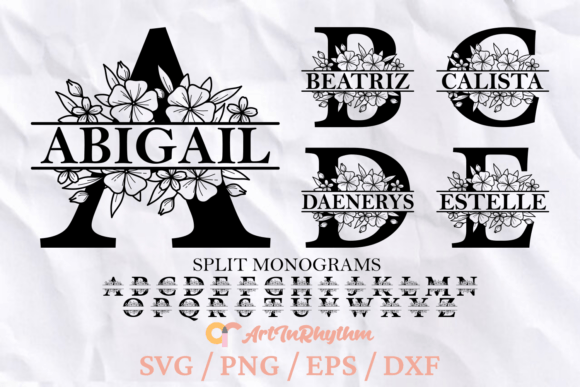
When you first encounter Floral Monogram Letters SVG, it’s important to adjust your expectations away from traditional typography. This is not a standard font file you install on your computer to type out words continuously. Instead, think of this collection as a curated set of premium design assets—individually saved letters that you arrange manually for maximum impact. The visual personality of these monograms is distinctly botanical and elegant. Each letter typically features intricate leafy vines, delicate petals, and organic flourishes that intertwine with the structural form of the character. Because they are vector-based SVG, DXF, and EPS files, you have infinite scalability without losing the crispness of those fine botanical details.
The appeal here lies in the display font aesthetic combined with the texture of nature. Unlike a rigid sans serif font, these letters feel alive. They possess a romantic, vintage, or garden-party vibe depending on how you use them. The inclusion of high-resolution PNG files (300dpi) means you aren't limited to vector software; you can drop these directly into photo editing software for layering. This collection is less about typing a sentence and more about creating a focal point. It serves the role of a handwritten font or script font but with much higher ornamental value, making it a powerful tool for logo design and monogramming.
Strategic Applications: Branding and Visual Hierarchy
For entrepreneurs and small business owners, Floral Monogram Letters SVG offers a distinct way to build brand identity. In a market saturated with clean, minimalist modern typography, a botanical monogram cuts through the noise. Consider a wedding planner, a boutique florist, or a skincare brand; these industries rely heavily on visual storytelling that evokes emotion and quality. Using these letters as the centerpiece of your logo establishes an immediate sense of artisanal care. It signals to your audience that your brand values detail and elegance.
When thinking about visual hierarchy in your layouts, use these monograms as anchoring elements. In editorial design, a large, floral initial can set the tone for a magazine cover or a chapter header. In packaging design, a gold-foil effect applied to these vectors creates a luxurious unboxing experience. Because these are design assets provided in multiple formats, they integrate seamlessly into various workflows. You can manipulate the SVG paths in Illustrator to change colors or remove specific vines, ensuring the asset fits perfectly with your existing color palette.
Pairing and Professionalism
One of the challenges of using highly decorative letters is maintaining readability and balance. You wouldn't use Floral Monogram Letters SVG for body text; that is the job of a clean serif font or sans serif font. The real power comes from font pairing. Place a bold, floral initial next to a clean, geometric sans-serif for a striking contrast. This juxtaposition prevents the design from feeling cluttered while still retaining the romantic personality of the monogram. This balance is crucial for professionalism—it shows you know how to combine creative fonts with functional typography to guide the reader's eye effectively.
Practical Workflow: Using the Instant Download
Since this is an instant download containing a ZIP file, your workflow needs to be organized. The package includes SVG, DXF, EPS, PNG, and PDF files. If you are a crafter using a cutting machine like a Cricut or Silhouette, the SVG and DXF files are your primary tools. They allow the machine to read the cut paths precisely. For digital marketers creating social media graphics, the PNG files are incredibly useful. They are pre-rendered at 300dpi and average 11 inches at their tallest/widest point, which means they are high-quality enough for both screen and small-format print.
Before purchasing, ensure your software supports these formats. If you are working in Canva, you will likely use the PNGs. If you are in Adobe Illustrator or Affinity Designer, the vector files allow for total customization. A key piece of advice: treat these letters as individual illustrations rather than a typeface. You cannot simply type "Happy Birthday" and have it appear. You must select "H," "a," "p," "p," "y" individually and arrange them. This takes more time than typing, but the result is a bespoke layout that feels handcrafted.
Evaluating Project Fit and Commercial Use
When deciding if this collection is right for your project, consider the context. Are you designing a stern corporate report? This might be too whimsical. Are you designing a wedding invitation, a bakery logo, or a lifestyle blog header? It is a perfect fit. The commercial font licensing for these assets generally allows for end-products like physical invitations or digital logos, but always verify the specific terms regarding mass production.
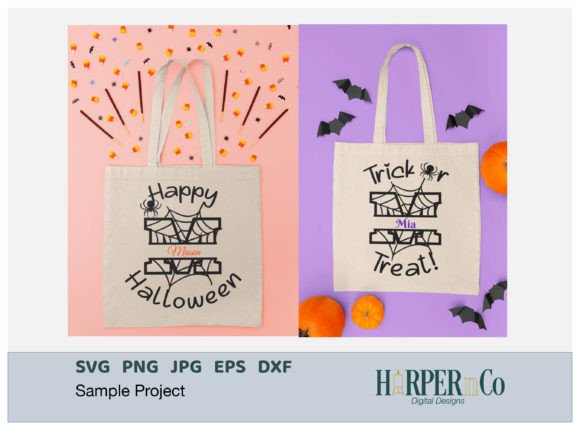
Finally, test the letters in context. Place the monogram on a mockup of a business card or a tote bag. Zoom in to check the details. Does the complexity of the floral elements get lost when printed small? If so, you might need to simplify the design or use it only for large-scale applications. By treating Floral Monogram Letters SVG as a strategic component of your design system rather than just a typing tool, you unlock its full potential to elevate your brand identity and engage your audience with timeless, organic elegance.