Urban Edge with Graffiti Text Effect Templates
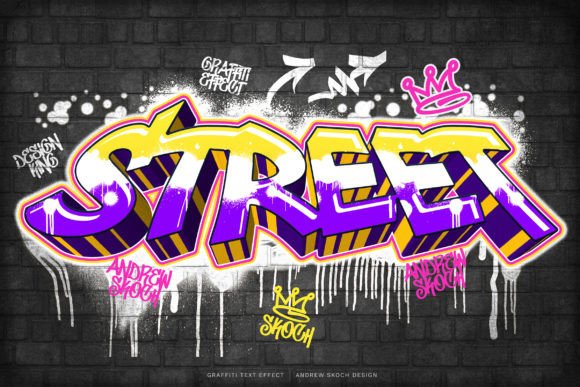
Sometimes, a project needs more than just a new font. It needs a voice, a texture, and an attitude that standard typefaces can't deliver. That's the power of a well-crafted visual effect. I've worked with countless design assets over the years, and the most valuable are those that save time without sacrificing creative control. This Graffiti Text Effect is exactly that kind of tool. It's not a font you install; it's a pair of professional Photoshop templates that transform any text you want into a photorealistic piece of street art.
What This Graffiti Effect Actually Does
Think of it as a style transfer for your typography. You have a message, and this effect gives it the visual language of a weathered city wall. The result has the gritty texture of concrete peeking through, the slight overspray of a spray can, and the dimensional quality of real paint. It looks authentic because the layers are built to mimic reality—light, shadow, and texture all interact correctly.
The core feature is its simplicity. You don't need to manually paint each letter or fiddle with complex blending options. The entire process revolves around Smart Objects. You open the template, double-click the smart object layer, paste your own text, and save. The effect applies automatically to your wording. It works with any font you have installed. Want to use a bold sans serif like Impact? It works. A decorative script font? It adapts. This flexibility means you can maintain your existing brand identity while adding a streetwise layer.
Where This Style Makes an Impact
The applications are broader than you might initially think. Of course, it's perfect for social media graphics—creating a standout YouTube cover, an Instagram banner, or a Facebook cover that stops the scroll. The urban aesthetic resonates with audiences looking for something bold, youthful, and energetic.
But its utility extends further into professional design assets:
- Editorial & Publishing: Use it for book covers, especially for young adult fiction, music biographies, or contemporary magazines. A cinematic title for a film poster or a CD cover for a hip-hop or rock album gains instant credibility with this look.
- Branding & Marketing: It can be a secret weapon for specific campaigns. Think event flyers, product launch posters, or limited-edition packaging for a beverage or streetwear brand. It signals a connection to urban culture, authenticity, and rebellion.
- Web & Digital: A website banner for a music festival, a skateboard shop, or a contemporary art gallery can use this effect to set the tone immediately. It creates a strong visual hierarchy, ensuring your headline is the undeniable focal point.
The key is to match the style to your project's personality. This isn't a serif font for a law firm's annual report. It's a display font effect for projects that need to shout, not whisper. Its value lies in its specificity.
Working With the Templates: Practical Guidance
You get two Photoshop templates—one landscape (3000x2000 px) and one square. Both are at 300 DPI, making them suitable for both digital and high-quality print output. The layers are well-organized, which is a professional courtesy I always appreciate. It makes tweaking individual elements—like the intensity of the texture or the color of the background—straightforward.
Here's my practical advice for getting the most out of them:
- Choose Your Words Wisely: Because this is a premium font effect, not a standard typeface, readability is paramount. Short, punchy phrases work best. A single word or a three-word headline will have more impact than a full sentence. Test your chosen text at a glance.
- Evaluate Font Pairings: The graffiti effect itself is the star, so pair it with clean, simple typography for supporting text. A neutral sans serif font for body copy or a date/location will let your stylized headline shine without creating visual chaos.
- Consider the Context: Where will this design live? On a phone screen, the texture will read as a bold color block. On a printed poster, the details of the concrete and paint splatter will come alive. Adjust your text size and composition accordingly.
- Leverage the Help File: The included PDF has links to free font downloads shown in the previews. While the effect works with any font, starting with one of those can help you achieve the exact look you saw in the demo quickly.
This is a creative font solution for when you need a specific, high-impact visual. It's not about replacing your entire typography library, but about having a powerful, editable tool for the right moment. For designers, marketers, and content creators, it’s a practical way to inject a dose of urban energy into a project without spending hours on manual creation. The ability to instantly change graffiti text to your own text makes it a versatile component in a modern creative toolkit.